Connecting to VIM-303 QuickPick User Interface
The VIM-303 vision guidance system (the camera) hosts a web interface called QuickPick at its host address on standard http port 80. The host address of the camera can be accessed in two ways:
- IPv4 address, found via the router or static address, such as 192.168.0.22
- mDNS address, which is found on the label on the back of the camera, including the suffix “.local”, for example vrobotics88ec.local, as shown on the camera below (Figure 1)
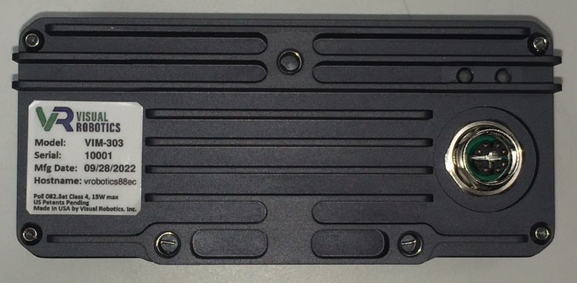
Figure 1: Back side of VIM-303 camera, showing hostname
For example, assuming the camera’s IP address were 192.168.0.22 and the hostname on the camera’s nameplate was vrobotics88ec, the QuickPick interface of the camera could be accessed in a browser (such as Google Chrome) by navigating to either the address 192.168.0.22 or vrobotics88ec.local (your browser will add “http://” automatically).